


OurFamilyWizard Co-Parent App
4.51.96K Reviews
App Specs
- Version
- 2026.7.2
- Updated On
- License
- Free
- Downloads
- 500,000+
- Developer
- OurFamilyWizard, LLC
- Categories
- Parenting
- Platform
- Android, iOS
Screenshots


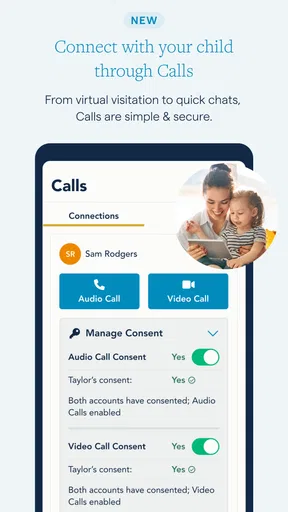


 Analysis by AppCompare
When parenting schedules, school messages, receipts, and last-minute changes are scattered across texts and email, even a simple handoff can turn into a search through old conversations. I find a dedicated space can help, but only if both parents are willing to use it consistently. OurFamilyWizard Co-Parent App is built for that shared routine, bringing practical co-parenting tasks together rather than treating them as separate problems.
What a shared system changes day to day
The main benefit I see is not that an app makes co-parenting easy; it is that a single record can reduce the effort of reconstructing who agreed to what. A calendar entry, a message, or an expense note is easier to revisit when it lives in the same family workspace. That can be useful when parents are coordinating across separate households, especially if plans change often or communication is tense.
It works best when both people agree on a few habits: put schedule changes in the calendar, keep child-related discussions in the message board, and record shared costs close to when they happen. Without that agreement, one parent may keep using texts while the other relies on the app, leaving the same information split across channels. The tool can support clear routines, but it cannot make the other person participate.
Speed expectations and the moments that test it
For ordinary tasks such as checking a schedule or adding a note, I would expect this kind of focused app to feel more direct than searching through a long text thread. The value is mostly in finding the relevant information in its proper place, not in flashy effects or complicated navigation. A quick glance before school pickup is a more realistic measure of usefulness than how many screens the app can show.
The more demanding moments are usually coordination-heavy rather than technically dramatic: a proposed custody swap, a school appointment that affects both homes, or several receipts that need to be logged after a busy week. In those situations, keeping each item attached to the right calendar or expense record can prevent a follow-up conversation from starting over. I would still check that a change has been recorded where both parents can see it, rather than assuming a message alone has changed the schedule.
One useful habit is to make the calendar the source of truth for dates and the message board the place for discussion. If a swap is only discussed in messages, it may be harder to spot later when scanning the schedule. Recording the agreed outcome in the calendar makes the distinction between a suggestion and a settled plan clearer. That small bit of discipline matters more than trying to use every tool every day.
Who benefits, and where a simpler option may win
I see the strongest fit for co-parents who need an organized record of scheduling, child-related communication, and shared expenses, particularly when informal conversation has become hard to track. A parent who wants to keep logistics separate from personal texting may also appreciate having a dedicated channel. The app is less compelling for parents who already coordinate smoothly with a shared calendar and a straightforward messaging routine, or for families who need only an occasional reminder.
Worth Reading Before You Choose

Flipboard Shows What News Apps Must Do Beyond the Feed

Switching to Android Auto Means Rethinking Your Driving Routine

Google Calendar Makes a Crowded Week Easier to Manage

Ludo King Makes the Most of the Minutes Between Plans

Baby Panda World Brings Quick Play to Modern Phones, but Its Game Library Feels Busy

ESPN’s Live Game View Makes Following Close Games Easier
Compared with using ordinary texts, email, and a general calendar, the appeal is having these co-parenting tasks gathered into one purpose-built place. The trade-off is that both parents have to adopt another app and maintain the records there. A shared calendar plus a messaging app may be lighter for cooperative households with few changes; a dedicated system makes more sense when keeping a coherent history is itself valuable. I would choose based on the coordination problem, not on the assumption that more features automatically mean less conflict.
Reliability, device fit, and the practical limits
Any shared system is only as useful as the information entered into it. If someone forgets to log an expense or records a schedule change in the wrong place, the app cannot correct that mistake. I would make entries promptly and use clear descriptions, especially for costs that may need to be discussed later. Attaching a receipt when adding an expense is a practical way to keep the supporting detail close to the amount instead of hunting for it in a camera roll or email.
OurFamilyWizard is a parenting app from OurFamilyWizard, LLC. It is free to download, has an Everyone age rating, and offers in-app purchases. Its current version is 2026.1.1, and it requires Android 10 or later. Those details are worth checking against your device and budget before both parents commit to using it. The app has a 4.5 average from around 13,000 ratings, and more than 500,000 installs; that gives a sense of its reach, though popularity alone cannot tell you whether its workflow suits your family.
I would not make a strong claim about speed, battery use, or recovery from a connection problem without testing the app on the devices and networks a family actually uses. In practice, I would try the routine tasks first: open the calendar, find an upcoming handoff, and record a sample expense. If the app feels slow on an older phone, a basic shared calendar may be a better fit for that household than relying on a tool that feels cumbersome in daily use. Keeping an important schedule accessible through a second agreed method can also be sensible when a phone is unavailable.
Getting Started with OurFamilyWizard
The first thing I noticed about OurFamilyWizard Co-Parent App is how easy it is to set up. You can download it from both the App Store and Google Play. Once installed, creating an account is a breeze. The interface is pretty clean and intuitive, so you won't find yourself scratching your head figuring out where things are.
Features that Make Life Easier
One of the standout features for me is the shared calendar. You can manage custody schedules, add appointments, and even request swaps. It’s super handy, especially when life throws unexpected events your way. The calendar syncs in real-time, so both parents are always on the same page.
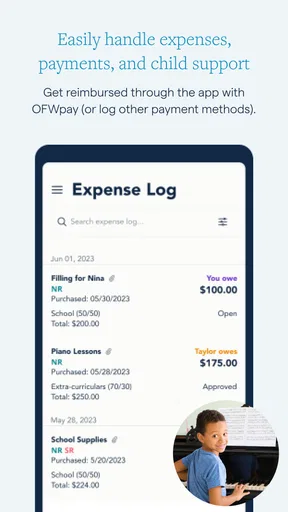
Another feature that's worth its weight in gold is the expense tracker. You can log expenses, attach receipts, and even split costs. No more back-and-forth emails about who owes what – it's all there in black and white.
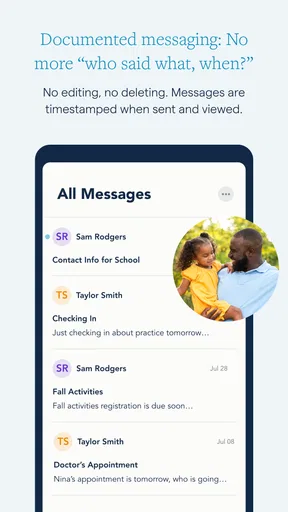
"The message board feature is great for keeping communication focused and organized."
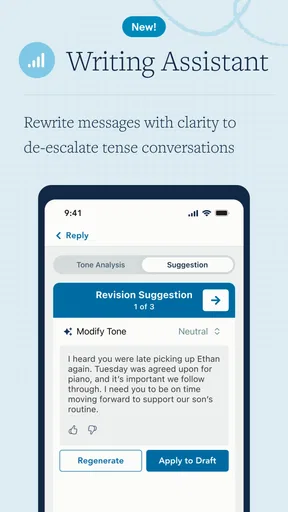
Speaking of communication, the message board feature is great for keeping everything focused and organized. You can send messages about anything related to your kids without the distraction of personal texts. Plus, there's a tone meter that helps you keep the conversation civil. How cool is that?
Security and Privacy
Privacy is a big deal, and I totally get it. OurFamilyWizard has built-in security features that ensure your data is protected. Everything from messages to expenses is stored securely, and you can even grant access to third parties like mediators or therapists if needed.
What Users Are Saying
From what I’ve gathered, most users are thrilled with the app. It's not just about the sheer number of features but how well they work together to make co-parenting smoother. Some parents have mentioned how it reduces misunderstandings and keeps everyone accountable.
Of course, no app is perfect. A few users have pointed out minor bugs here and there, but the developers seem pretty responsive to feedback. Regular updates mean they're constantly working to improve the experience.
Final Thoughts
All in all, the OurFamilyWizard Co-Parent App is a solid choice for co-parents looking to streamline their communication and scheduling. It's user-friendly, packed with features, and prioritizes security. Whether you're newly separated or just looking to improve your current system, this app could be a game-changer.
If you're interested in giving it a whirl, you can find it on both Android and iOS. Happy co-parenting!
Pros
- Intuitive interface for easy navigation.
- Comprehensive scheduling tools included.
- Messaging feature keeps communications clear.
- Expense tracking simplifies financial management.
- Access to important documents anytime.
Cons
- Some features require a subscription.
- Initial setup can be time-consuming.
- Limited customization options.
- Occasional syncing issues reported.
- Notifications can be overwhelming.
FAQs for OurFamilyWizard Co-Parent App
What is OurFamilyWizard, and how does it benefit co-parents?
OurFamilyWizard is a communication tool designed to facilitate better interactions between co-parents. It offers features such as shared calendars, messaging, and expense tracking to minimize conflicts and misunderstandings. By centralizing all co-parenting communication, it helps create a more organized and peaceful co-parenting experience.
How secure is the information shared on OurFamilyWizard?
The app prioritizes user privacy and security by employing advanced encryption methods to protect data. It ensures that all information, including messages and financial records, is securely stored and accessible only to authorized users. This level of security helps users feel confident in sharing sensitive information.
Can OurFamilyWizard be accessed on multiple devices?
Yes, OurFamilyWizard is available on both Android and iOS platforms, allowing users to access it from smartphones, tablets, and computers. This cross-device compatibility ensures that co-parents can stay connected and manage their parenting responsibilities from anywhere, at any time.
What features does OurFamilyWizard offer to improve co-parenting communication?
The app includes features such as a shared calendar for scheduling, an expense log for financial tracking, and a message board for communication. It also offers tools like the ToneMeter, which helps parents communicate more effectively by suggesting less confrontational language, promoting a healthier dialogue.
Is there a cost associated with using OurFamilyWizard?
Yes, OurFamilyWizard requires a subscription, but it offers various pricing plans to suit different needs. The cost is justified by the comprehensive features it provides, which can help reduce legal fees and the stress associated with co-parenting disputes. Some users may also be eligible for discounts or assistance programs.


